Hundreds of laptop listings, changing sale prices, and confusing processor names can turn a simple purchase into a long night of comparison tabs. A search for a best buy laptop can be useful, but finding the best laptop deals requires more than simply clicking the top featured option on your screen, as it may not be the right match for your work, school, or home life.
This comprehensive laptop buying guide helps you balance daily performance, comfort, reliability, and price. These practical reviews, shopping tips, price checks, and FAQs apply whether you are tracking down a reliable retail machine, browsing top windows laptops, or shopping directly from a manufacturer.
Key Takeaways
- Choose a computer based on your workload rather than chasing the biggest price drop when browsing best laptop deals.
- For most buyers, 16GB of RAM and a 512GB solid state drive offer a comfortable starting point.
- Chromebooks fit browser-based schoolwork, while choosing the right operating system ensures support for broader software needs.
- Compare exact model numbers, memory, storage, seller, and return terms before buying.
- Open box deals can save money when condition grades and return policies are clear.
- Disclosure: This post contains Amazon affiliate links. I may earn a commission if you purchase through these links at no extra cost to you.
How to Find the Best Buy Laptop for Your Needs
The right computer depends on what you do most, how often you carry it, and how long you expect to keep it. A family computer for bills and streaming needs less power than a laptop used for video editing, programming, or modern games.
Start with system memory ram and storage. 8GB RAM is workable for basic browsing, documents, and streaming. 16GB RAM keeps many browser tabs, video calls, and office apps running more smoothly. For most people, a 512GB solid state drive gives useful room for files and apps, while also loading faster than an old-style hard drive.
Evaluating each processor brand can be tricky because Intel Core Ultra, AMD Ryzen, Apple silicon, and Qualcomm Snapdragon chips all come in several performance levels. Compare the exact processor generation and the laptop’s cooling design, not only the family name, especially if you are looking closely at an intel core processor. Best Buy’s laptop buying guide is a helpful reference for screen types, operating systems, and form factors, including popular 2 in 1 laptops.
Performance on windows laptops works with the widest range of work, school, and game software. Choosing the right operating system also means deciding if macOS makes sense for people already using an iPhone, iPad, or creative software built for Apple hardware, or if chrome os is simple, secure, and affordable when most tasks happen in a browser.

Check current configurations, stock, and prices on the day you buy. Retailers often sell the same laptop name with different RAM, storage, or display options.
Match the Laptop to the Way You Work and Study
Students need good battery life, a dependable keyboard, and enough system memory ram for research tabs and video classes. A 13-inch or 14-inch screen size is easier to carry, while a 15-inch or 16-inch screen size is more comfortable for spreadsheets, split-screen work, and versatile 2 in 1 laptops.
Remote workers relying on windows laptops should prioritize a 1080p webcam, clear microphones, Wi-Fi reliability, USB-C charging, and HDMI or USB-A ports for monitors, often connecting through a docking station alongside helpful laptop accessories. Durable business laptops benefit from sturdy hinges, comfortable keyboards, and serviceable designs.
Creative work involving video editing needs a color-accurate display, long battery life, fast storage, and more memory. Gamers looking at high-end gaming laptops need a dedicated graphics processing unit, adequate cooling, and a high-refresh-rate screen. When comparing gaming laptops, a thin computer may look appealing, but extra heat and fan noise can become tiresome during long sessions.
The Specifications That Matter Most at Each Price Point
| Price range | Typical strengths | Watch for |
|---|---|---|
| Under $500 | Web browsing, schoolwork, basic office tasks | 8GB RAM, 128GB storage, dim screens |
| $600 to $1,000 | 16GB RAM, 512GB solid state drive, stronger build quality | Retailer-only configurations |
| Over $1,000 | Better displays, faster chips, premium materials | Paying for power you won’t use |
A processor brand name or a large storage claim doesn’t tell the whole story. A cheap model with a weak screen resolution, soldered 8GB system memory ram, and a cramped keyboard can feel outdated long before its battery life or storage fills up.
Best Buy Laptops and Quality Amazon Alternatives to Consider
These picks cover distinct needs instead of repeating similar machines. Prices are common new-retail ranges, not live quotes. Before ordering, confirm the precise model number, RAM, storage, return deadline, and whether Amazon is the seller rather than an unknown marketplace business.
Best Budget and Student Laptops and Chromebooks
Lenovo IdeaPad Flex 5i Chromebook Plus often lands around $350 to $500 with an intel core processor, 8GB RAM, 128GB or 256GB storage, and a 14-inch touchscreen. It suits online classes, Google Workspace, and streaming. As one of the top touch screen laptops in its class, it doubles nicely among 2 in 1 laptops for flexible study habits. Battery life is usually strong, but chrome os can’t run every Windows school program. This budget friendly option is among the most versatile chromebooks available, and many configurations include a speedy solid state drive. Buy from a retailer with simple returns because keyboard and screen configurations vary, making these budget friendly chromebooks a smart choice for daily note taking.
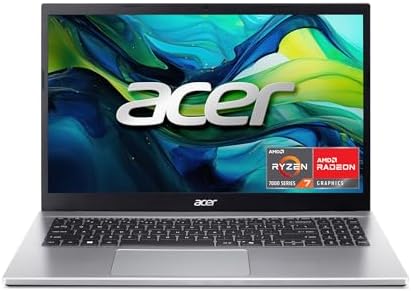
Acer Aspire 15
is a budget friendly choice for students who need Windows software. Configurations around $450 to $650 Acer Aspire Go 15 AI Ready Laptop | 15.6″ FHD (1920 x 1080) IPS Display | AMD Ryzen 7 7730U | AMD Radeon Graphics | 16GB DDR4 | 512GB PCIe Gen4 SSD | Wi-Fi 6 | Windows 11 Home | AG15-42P-R9FWuseful ports and an easy-to-use keyboard, though lower-priced versions may have a dim panel and average webcam. I highly recommend, you can check it out on amazon 👇
ASUS Vivobook 16
gives home users a larger screen for documents and streaming. A sensible version Copilot+ PC, 16” WUXGA 60Hz Display, AMD Ryzen AI 5 340 with XDNA NPU, AMD Radeon Graphics, 16GB RAM, 512GB SSD, solid state drive, generally around $550 to $850. This budget friendly machine handles light multitasking well, but its larger size makes it less convenient in a backpack.
i highly recommend, you can check it out on amazon 👇


Best Laptops for Work, Business, and Remote Jobs
Lenovo ThinkPad E16 Gen 2
Lenovo ThinkPad E16 Gen 2 is a powerful business laptop designed for professionals who need reliable performance and smooth multitasking. This configuration comes with an AMD Ryzen 7 7735HS 8-core processor, 16GB DDR5 system memory RAM, and 512GB SSD storage, making it suitable for demanding office tasks, productivity software, and business workloads. It features a 16-inch FHD+ display that provides a spacious viewing area, while the legendary ThinkPad backlit keyboard delivers a comfortable typing experience. Additional features include WiFi 6E connectivity, a fingerprint reader, USB-C support, Windows 11, and included Office 365, making it a complete Windows business solution. With its strong performance, premium security features, and enterprise-focused design, the ThinkPad E16 Gen 2 is an excellent choice for users seeking a dependable professional laptop. Its larger 16-inch size adds some weight compared to ultraportable models, but the improved screen space and powerful hardware make it ideal for productivity and business use.the price can range from $800 to $1,500
i highly recommend, you can check it out on amazon 👇

Microsoft Surface Laptop 7
Microsoft Surface Laptop 7 AI PC is a premium and portable business laptop designed for professionals who need mobility, performance, and long battery life. Powered by the Snapdragon X Plus processor with 16GB DDR5 RAM and 1TB SSD storage, it delivers smooth multitasking and efficient performance for everyday productivity, business applications, and AI-powered workflows. It features a 13.8-inch 2K+ touchscreen display with a sharp and vibrant viewing experience, along with a high-quality IR webcam for secure facial recognition and clearer video meetings. With Wi-Fi 7 connectivity, Windows 11, and Copilot+ PC features, it is built for modern workplace needs. The standout advantage is its impressive battery efficiency, offering up to 20 hours of battery life, making it ideal for frequent travelers and remote professionals. However, users should confirm that their specialized Windows applications, drivers, and peripherals are compatible with the ARM-based Snapdragon platform before purchase. prices can range from $850 to $1600
i highly recommend, you can check it out on amazon 👇

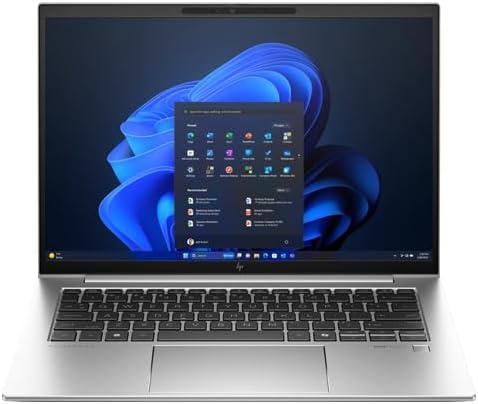
HP EliteBook 840 G11 appeals to buyers who want a durable 14-inch business laptop with enterprise suppotrts Intel Core Ultra 7 165U – vPro Technology – 16 GB – 512 GB SSD – English Keyboard configuration often costs $1,100 or more. It offers useful ports and solid security options, but consumer sales can make a premium model less expensive than a business listing. It ranges from $1,800 to $2,200
Best Premium, Creative, Gaming Laptops, and Two-in-One Options
Apple MacBook Air with M4 is an excellent ultraportable for writing, photo work, video calls, and everyday creative tasks. Choose 16GB unified memory and at least 512GB storage if you plan to keep it for years. It offers long battery life and a quiet design, but ports are limited and storage upgrades cost more. New models often begin near $1,000. For heavier video editing tasks, many creators prefer a macbook pro over the standard macbook air because a macbook air lacks active cooling for intense workloads, whereas a macbook pro handles sustained video editing much better.
HP Spectre x360 14 is a flexible Windows two-in-one for note-taking, presentations, and light creative work. Look for 16GB RAM, a 512GB solid state drive, and an OLED display, usually around $1,000 to $1,500. This versatile touch screen laptop and 2 in 1 device stands out among windows laptops, though glossy panels reflect light and the slim body limits upgrades.
ASUS ProArt P16 targets photographers and video editors with a high screen resolution display, fast AMD processor options, 32GB RAM configurations, and a dedicated graphics processing unit. Prices often start above $1,700. It has serious performance, rivalling a macbook pro for heavy creative output, though it is heavier, warmer, and louder than a basic laptop.
ASUS ROG Zephyrus G14 is a strong option for gaming laptops with a dedicated graphics processing unit, 16GB or 32GB RAM, a 14-inch screen size high-refresh display, and 1TB storage options. Expect $1,300 to $2,000 depending on graphics. Among portable gaming laptops, this specific screen size and high screen resolution provide crisp visuals, while the powerful graphics processing unit makes these gaming laptops ideal for enthusiasts.
How to Compare Laptop Prices, Retailers, and Long-Term Value
Best Buy can be easier for same-day pickup, hands-on inspection, Geek Squad support, and open box deals. Shoppers looking for a best buy laptop benefit from these perks, alongside open-box listings. Amazon can have wider selection and fast delivery, but check the seller line carefully. Manufacturer stores may offer education pricing, custom configurations, or direct warranty support when you are cross-shopping windows laptops.
Retailer-exclusive model numbers make comparisons difficult. Match the processor, system memory ram, SSD capacity, screen resolution, and warranty length before deciding that one listing is cheaper. Best Buy’s current laptop selection shows how widely specifications can differ within familiar product families.
A $100 discount isn’t a bargain if the lower-priced version cuts RAM from 16GB to 8GB or replaces a bright screen with a basic panel.
When a Laptop Deal Is Actually Worth Buying
Finding the best laptop deals requires looking beyond a crossed-out manufacturer price. A worthwhile sale has a current-generation processor, enough RAM, practical SSD storage, and a screen you can use comfortably.
Avoid old stock with poor battery life, weak screens, or memory that can’t be upgraded. When evaluating if best laptop deals are genuine, a thorough laptop buying guide will recommend looking closely at RAM and long-term use rather than chasing a headline discount on a MacBook Air or MacBook Pro.
Open-Box, Refurbished, and Used Laptop Buying Tips
Open-box usually means a customer return, while manufacturer-refurbished products have been inspected and repaired when needed. Used laptops vary far more, so they carry greater risk.
Check battery life, cosmetic grade, charger inclusion, warranty coverage, and the return window. For Macs, confirm Activation Lock is removed. When hunting for reliable open box deals on any expensive best buy laptop or Amazon alternative, buy only from a seller with clear condition notes and reliable support.
A Simple Laptop Buying Checklist Before You Pay
Before you check out, work through these decisions in order:
- Set a firm maximum budget, including a case, a docking station, Microsoft 365, or other necessary laptop accessories.
- Pick Windows, macOS, or ChromeOS based on the programs you must run, and always verify that your chosen operating system supports your daily software.
- Confirm the exact intel core processor, 16GB RAM when possible, and at least a 512GB solid state drive for broad use.
- Inspect display brightness, resolution, optional features like touch screen laptops, webcam quality, ports, Wi-Fi version, weight, and expected battery life.
- Read warranty terms, upgrade options, and the return deadline before the package arrives.
A low price can cost more later if you must add storage, a webcam, adapters, or memory immediately. Plan for the next three to five years, especially if your work or school demands may grow.
Common Mistakes That Lead to a Bad Laptop Purchase
Don’t confuse storage capacity with speed, and do not let impulse buying for low-tier best laptop deals or unverified open box deals override your spec requirements. Don’t ignore the keyboard, screen, and webcam because you focused on the processor. Also avoid marketplace listings that hide the seller or use vague condition descriptions, especially when hunting for budget friendly machines.
Heavy gaming laptops add cost, heat, and weight when you only need email and spreadsheets. On the other hand, very cheap chromebooks or basic systems can struggle with demanding video editing, coding, or video-call work from day one. Skipping the right laptop accessories or rushing past the operating system requirements will only lead to frustration, so make sure your final choice matches your real needs rather than just the most appealing best laptop deals on the screen, or the heavy weight of gaming laptops that look flashy online.
Frequently Asked Questions
Is 8GB of RAM enough for a new laptop?
It is enough for basic browsing, documents, email, and streaming, especially if you are using lightweight options like chrome os. Choose 16GB of system memory ram if you keep many tabs open, join frequent video calls, or want the laptop to remain comfortable for several years.
Should I buy a 13-inch or 15-inch laptop?
Choosing the right screen size depends on your workflow. A 13-inch or 14-inch model, which includes popular ultraportable 2 in 1 laptops and the thin macbook air, is easier to carry and fits small tables. A 15-inch or 16-inch screen, common in powerful productivity machines and creative workstations like the macbook pro, gives you more workspace for spreadsheets, touch screen laptops usage, and multitasking. If you prefer the absolute lightest weight for daily travel, another macbook air option might suit you best.
Are extended laptop protection plans worth it?
They can make sense for a costly laptop that travels often, such as an expensive best buy laptop, or for a buyer who values in-person support. Read the accidental-damage terms first, because many plans duplicate coverage already offered by a credit card or manufacturer warranty.
Can I trust laptop ratings on Amazon?
Ratings are useful for spotting recurring issues, such as poor battery life or unreliable hinges. Still, read recent written reviews for the exact configuration and confirm who sells and ships the laptop.
Make the Purchase Fit Your Real Life
The best laptop purchase isn’t always the fastest or cheapest model. The right configuration gives you enough performance, a comfortable screen and keyboard, dependable support, and a price that fits your budget. Whether you are shopping for everyday windows laptops, versatile 2 in 1 laptops, lightweight chromebooks, or powerful gaming laptops, the goal remains the same.
Compare exact specifications instead of relying on a processor brand or discount banners. Make sure to double check your preferred screen resolution, factor in any necessary laptop accessories, and hunt for genuine best laptop deals before you buy from Amazon, Best Buy, or a manufacturer to secure your ultimate gaming laptops and best buy laptop.